
Cricbuzz - Live Cricket Scores
Cricbuzz.comSports
3.715.53K Reviews
- Version
- 16.04.00
- Installs
- 100.00M
- Age Rating
- Everyone
Screenshots
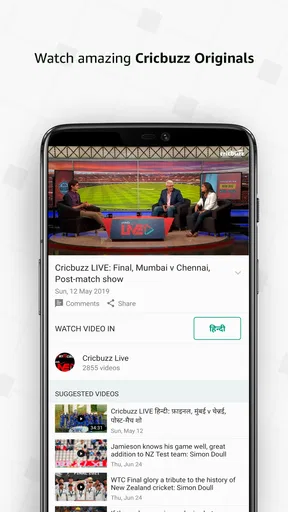
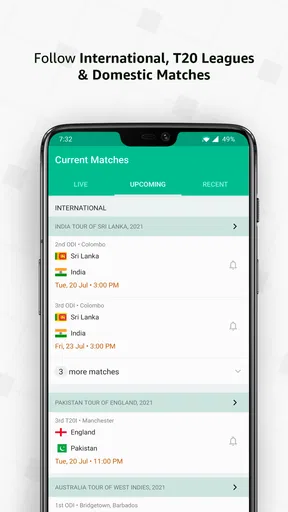
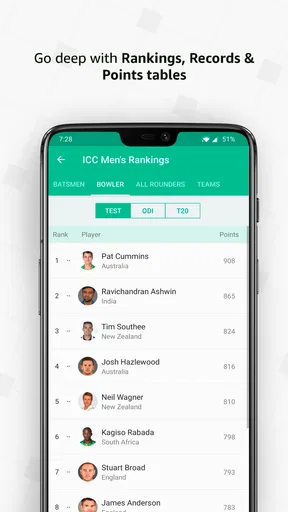
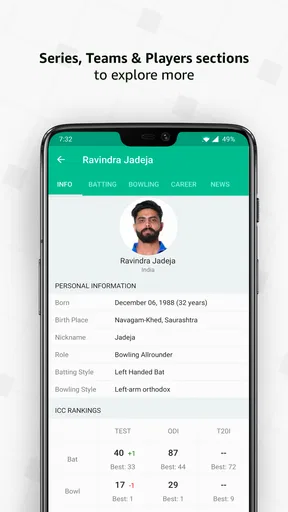
Our Review of Cricbuzz - Live Cricket Scores
 Analysis by Appyee
When I first open Cricbuzz - Live Cricket Scores, I want to know two things: can I find a match quickly, and can I follow it without stopping whatever else I’m doing? For me, that is where this cricket app makes its strongest case. It brings scores, commentary, news and statistics together, so I can move from a quick glance to a closer look without hunting across several sites. It is a free sports app from Cricbuzz.com, suitable for everyone, and the basics are easy to approach even if I am still learning how cricket works.
Getting from the first screen to a useful match update
I use this section to make the first check count: choose a match that matters to you, then read the latest commentary entry alongside its score rather than trying to learn every screen at once. That gives a first-time user a quick way to see whether text updates are enough for their routine, or whether watching a stream or using a simpler scoreboard would suit them better.
What to expect when you open the app
The first screen is built around current cricket activity rather than a long setup process. I can start by looking for a match that is underway, then use the score and commentary to understand how it is progressing. That makes the app useful even before I have decided which teams or competitions I want to follow regularly. Its main strength is not just displaying a number; it gives me a way to keep track of the story behind the score.
As a first-time user, I would not try to explore every section immediately. I would pick one match, read a few commentary entries, and then check the score again. That simple loop shows whether the level of detail suits me. Someone who only needs a quick result can stop at the score, while a more involved fan can use the commentary and statistics to add context.
Making the first visit feel manageable
I would begin by choosing a team or tournament I already care about, rather than following everything at once. A focused feed is easier to scan, especially during a busy day when several matches and cricket stories compete for attention. If I am not ready to personalize anything, I can still browse the available match information first and make those choices later.
Notifications are worth treating as a small tuning exercise. I would enable only the alerts that help me, such as updates for a match I genuinely intend to follow, instead of turning on every possible prompt. That keeps a cricket app useful during work, travel or family time rather than letting it become another source of interruptions. If the alerts feel too frequent, narrowing the teams and tournaments I follow is a better first adjustment than abandoning notifications altogether.
A practical first success: follow one live innings
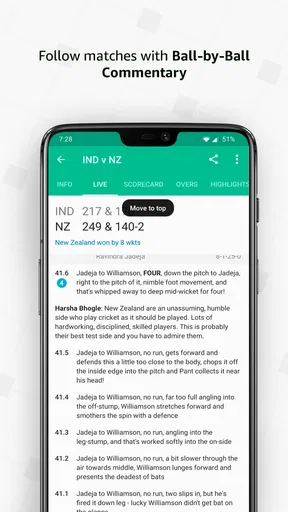
My first useful action would be opening a live match and reading the ball-by-ball commentary alongside the score. For example, if I am waiting for a train and cannot watch video, I can check the latest entry, put the phone away, and return a little later to see what changed. The score gives me the snapshot; the commentary helps explain how the innings reached it. That combination is more informative than repeatedly refreshing a bare scoreboard.
For a new cricket follower, the commentary can also make the numbers less intimidating. I can follow the sequence of events without needing to know every statistic in advance. When a moment prompts a question, I can move to the available player or team information rather than interrupting the match flow to search elsewhere. I find that this works best as a quick companion to a game, not as a promise that reading updates will feel identical to watching the action.
Choosing between scores, news and deeper stats
Once I have followed a match, I can decide what I want from the app next. The news section is the natural stop when I want a broader picture than one scorecard: previews and post-match coverage can help me understand what people are discussing around a game. I would use it selectively, though. If I only have a minute, checking the match itself is more direct; if I have time before or after play, news gives me a different kind of value.
The statistics are most useful when I have a specific question. I might look up a player’s past performances or compare players when a selection or result has caught my attention. That is a more satisfying way to explore than tapping through numbers at random. Rankings and historical context can help explain a team’s standing, but they do not replace the immediate match picture, so I treat stats as a second layer rather than the main reason to open the app every time.
Where it fits among cricket apps and other ways to follow a match
Compared with a general sports app, Cricbuzz keeps its attention on cricket, which is helpful if I want match commentary and cricket-specific context without unrelated leagues filling the same space. Compared with a simple score widget or a search result, it offers more to explore after I see the score: news, player and team statistics, and discussion. The trade-off is that someone who wants only a bare result may find those extra sections unnecessary.
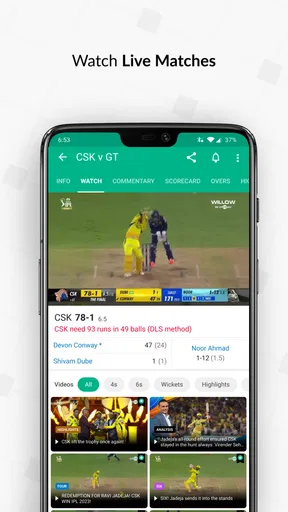
It is also different from watching a live stream. A score-and-commentary workflow is practical when I am in a place where watching video is inconvenient, but it cannot provide the visual feel of a broadcast. The store summary notes live streaming for major cricket events, including the IPL and World Cup; if watching is the priority, I would check whether the relevant stream is available in the app for the match I want. For quick tracking, commentary remains the more useful route when I cannot keep video open.
Small habits that make following cricket easier
One habit I find useful is to decide in advance whether I am following the match casually or closely. For casual tracking, I check the score and a recent commentary entry, then leave the app. For closer attention, I keep the match open and use the commentary to follow changes as they happen. This avoids turning every glance into a long session and makes the app fit around the day rather than the other way around.
Another useful approach is to separate match interest from general cricket interest. I might follow a team for live alerts but open the news section only when I want broader coverage. That distinction helps keep notifications relevant while still leaving room to explore interviews, previews or analysis on my own terms. It is a small choice, but it can make a crowded cricket calendar feel more manageable.
I also try not to treat statistics as a verdict on a player. Past numbers and comparisons are useful context, but a live innings is still unfolding, and one figure cannot explain every decision or performance. The app gives me material to investigate; I still need to read it in the context of the match. That is particularly important for newcomers, who may otherwise see a ranking or comparison and assume it tells the whole story.
Who will get the most from it—and who may prefer something else
I think the app is a strong fit for people who follow cricket across the day, especially fans who want more than a final score but cannot always watch a match. It also suits someone building a routine around a favorite team: check the score, read the commentary, then dip into stats or news when a question comes up. With an average rating of 3.7 from around 3.1 million ratings, it has attracted a large audience, though that broad response does not mean every fan will like the same interface or level of detail.
I would point a casual sports follower who only wants occasional results toward a simpler scoreboard if extra cricket coverage feels like clutter. Likewise, if my main aim is to watch a particular match, a video-first service is a better fit whenever the stream I need is available. Cricbuzz makes more sense when I want cricket information I can scan and revisit, not when I expect every part of the sport to be delivered as live video.
Common points of confusion on a first visit
A live score and a live stream are not the same thing. The score and ball-by-ball commentary are useful for following play in text, while streaming is about watching video. I would check the match page for the option relevant to me rather than assuming every match will be experienced in the same way. That distinction also helps set expectations if I open the app in a place where I can read but cannot watch.
It is easy to assume that a personalized feed will immediately show only the things I care about. I would instead treat following teams and tournaments as a way to focus the experience, while still checking the broader match and news areas when I want to browse. Similarly, a notification is a prompt to return to the app, not a substitute for choosing which match matters to me. A little selectivity at setup makes the app calmer and more useful.
How it holds up in everyday use
In a realistic day, I might check a score during a break, read the latest commentary while walking to an appointment, and return to the news later at home. Each visit has a clear purpose, and I do not need to watch a whole match or study every statistic to get something from it. That makes the app especially practical for fans whose schedules rarely line up with a full broadcast.
The main friction is that a cricket-focused app can offer more material than I need at any given moment. If I open it without a question in mind, it is easy to drift from a quick score check into news, stats and community discussion. I avoid that by deciding whether I want a result, match context or wider coverage before I start. The breadth is an advantage when I want it, but it rewards a little intention.
Room to grow with the game
For someone learning cricket, I would start with live commentary and scores, then use the statistics only when they answer a concrete question. That path feels less overwhelming than trying to understand every table at once. As I become more familiar with teams and players, news and comparisons become more rewarding because I have enough context to know why a result or performance matters.
The app has been available since February 18, 2011, and its current version is 16.04.00. It is listed for devices running Android 7.0 or later, and its age rating is Everyone. Those details make it straightforward to judge basic compatibility before installing; the practical test after that is whether its cricket coverage and notification choices suit my habits.
What stands out after spending time with it
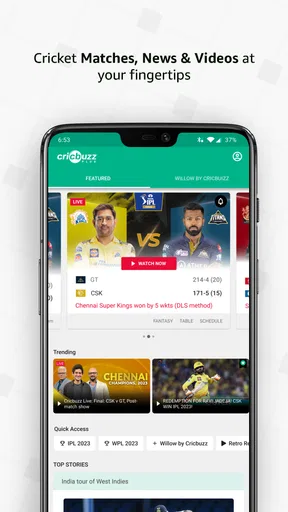
As soon as you fire up the Cricbuzz - Live Cricket Scores app, you’re greeted with a clean and intuitive interface. The layout is super user-friendly, which makes it easy to navigate even if you’re not tech-savvy. The colors are vibrant yet easy on the eyes, and everything is logically organized, so you can find what you need without any hassle.
One thing that stood out to me was the live match updates section. It’s right there on the homepage, and you can quickly see what’s happening in real time. No more scrambling for the remote or refreshing your browser every few minutes!
Features That Hit It Out of the Park
Let’s dive into the features because this app is packed with goodies. First off, the live scores feature is super detailed. Not only do you get the score, but you also get a ball-by-ball commentary that keeps you in the loop as if you’re watching the game live. This is perfect for those times when you’re stuck at work or on the go.
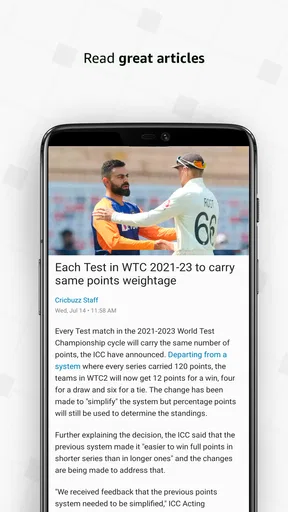
Another gem is the news section. Cricbuzz does a fantastic job of curating the latest cricket news from around the globe. Whether it’s player interviews, match previews, or post-match analyses, it’s all there. And the best part? It’s updated frequently, so you’re always in the know.
If you’re into stats, you’ll love the player and team statistics available on the app. You can delve into past performances, compare players, and even check out team rankings. It’s like having a cricket encyclopedia in your pocket.
Personalization and Notifications
One of my favorite features is the ability to customize notifications. You can set alerts for your favorite teams and matches, ensuring you never miss a beat. The notifications are timely and not intrusive, which is a big plus. I mean, who wants to wake up to a barrage of alerts, right?
The app also allows you to personalize your feed. You can choose which teams and tournaments you want to follow closely, and the app tailors the content accordingly. It’s a small feature, but it makes a big difference in how you consume cricket content.
The Social Aspect
Cricbuzz has a pretty active community section where fans can discuss matches and share opinions. It’s like having a virtual hangout spot for cricket enthusiasts. You can engage in discussions, read what others have to say, and even contribute your two cents. It’s perfect for those who love to dissect every match detail with fellow fans.
The community is an optional extra, not a necessary stop on the way to a score. I would read along when I want to see how other supporters are reacting, but I would keep the commentary as my main source for following the match itself. Fan discussion can add energy and different viewpoints; it can also be more subjective than a score update, so I treat opinions as conversation rather than match facts.
My verdict after making it part of a cricket routine
All in all, the Cricbuzz - Live Cricket Scores app is a must-have for anyone invested in cricket. It’s comprehensive, user-friendly, and packed with features that keep you connected to the sport you love. Whether you’re checking scores on the go or diving deep into match statistics, Cricbuzz has you covered.
If you haven’t already, I’d recommend downloading it and giving it a spin. Trust me, once you start using it, you’ll wonder how you ever followed cricket without it!
Verdict
Strengths of Cricbuzz - Live Cricket Scores
- Real-time score updates are reliable.
- User-friendly interface for easy navigation.
- In-depth analysis and commentary available.
- Comprehensive coverage of global matches.
- Custom notifications for favorite teams.
Limitations of Cricbuzz - Live Cricket Scores
- Ads can be intrusive during usage.
- Limited offline content availability.
- Video highlights may buffer occasionally.
- Some features require in-app purchases.
- Occasional bugs in live score updates.
Similar Picks in This Category
View All
BeSoccer: Soccer Live Score
BeSoccer apps4.3

NFL
NFL Enterprises LLC2.4

Da Fit
MO YOUNG LIMITED3.6

ESPN
Disney4.5

LiveScore: Live Sports Scores
LiveScore Limited4.5

You May Also Like
View All
Frequently Asked Questions
What features does Cricbuzz offer for cricket fans?
Cricbuzz provides live cricket scores, ball-by-ball commentary, and detailed match analysis. It also includes player statistics, team rankings, and upcoming match schedules. Users can receive push notifications for live match updates and breaking news. The app features expert opinions and articles, making it a comprehensive resource for cricket enthusiasts.
Is Cricbuzz free to use, or are there any in-app purchases?
Cricbuzz is free to download and use, offering a wide range of features at no cost. However, it does offer a premium subscription, Cricbuzz Plus, which provides an ad-free experience and access to exclusive content like interviews, documentaries, and long-form articles. This optional subscription enhances the user experience but isn't necessary for basic functionality.
Can I use Cricbuzz offline?
While Cricbuzz is primarily designed for real-time updates, some features can be accessed offline. Users can view previously downloaded articles, player statistics, and match summaries without an internet connection. However, live scores, commentary, and news updates require a stable internet connection to provide the latest information.
Does Cricbuzz cover all cricket formats and tournaments?
Yes, Cricbuzz covers a wide range of cricket formats, including Test matches, One Day Internationals (ODIs), and Twenty20 Internationals (T20Is). It also provides coverage of major tournaments like the ICC World Cup, T20 World Cup, and various domestic leagues such as the IPL, BBL, and CPL, ensuring comprehensive coverage for fans.
How does Cricbuzz compare to other cricket apps?
Cricbuzz stands out due to its user-friendly interface, comprehensive coverage, and real-time updates. It is highly rated for its detailed ball-by-ball commentary and expert analysis. While other apps may offer similar features, Cricbuzz's extensive database and engaging content make it a preferred choice for many cricket fans globally.
